Lab 02: Architektura i wzorce budowy agentów
Opis
Kompleksowy przewodnik po architekturze Azure AI Foundry Agent Service - od podstawowych komponentów agenta, przez model konwersacji (Threads/Runs/Messages), po wzorce wdrożenia i metodologie budowy produkcyjnych agentów. Dowiesz się kiedy użyć wbudowanego runtime (70-90% przypadków) vs custom builds (12-Factor Agents).
Wprowadzenie: Co to jest AI Agent?
Key Points:
- Agent = Model + Instructions + Tools
- Agent vs Assistant = Autonomia (agent sam realizuje cele)
- Agent Service = “the glue” łączące wszystkie komponenty
- 70-90% przypadków pokrywa runtime Azure AI Foundry
Definicja agenta
Agent AI to system, który:
- Podejmuje decyzje samodzielnie
- Wywołuje narzędzia (tools) do wykonania akcji
- Realizuje wieloetapowe workflow bez ciągłego nadzoru człowieka
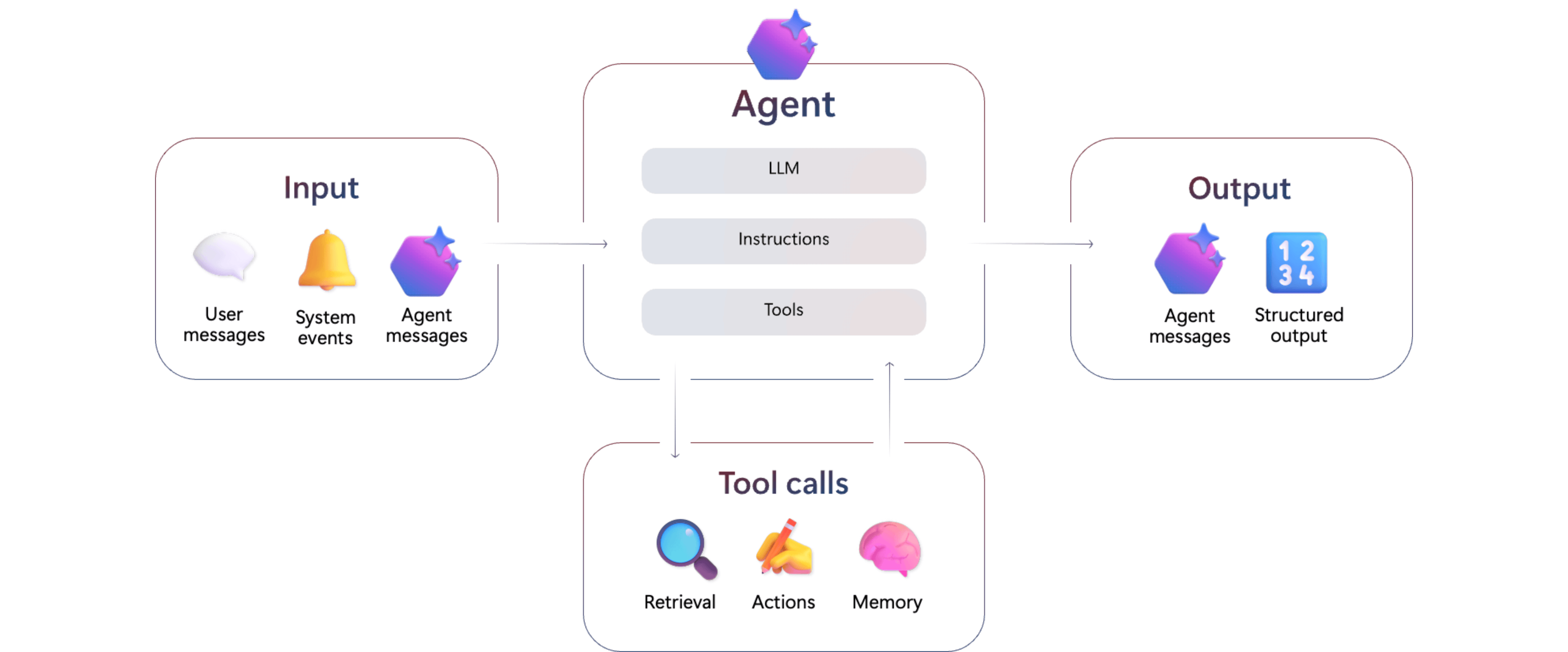
3 komponenty agenta: Model (reasoning), Instructions (behavior), Tools (capabilities)
Agent Service jako “the glue”
Azure AI Foundry Agent Service łączy:
- Modele (Azure OpenAI, Open Source)
- Tools (Bing, Azure AI Search, Functions, APIs)
- Frameworks (LangChain, Semantic Kernel, custom code)
- Infrastructure (Identity, Networking, Observability, Security)
…w jeden runtime, który zarządza całym lifecycle agenta.
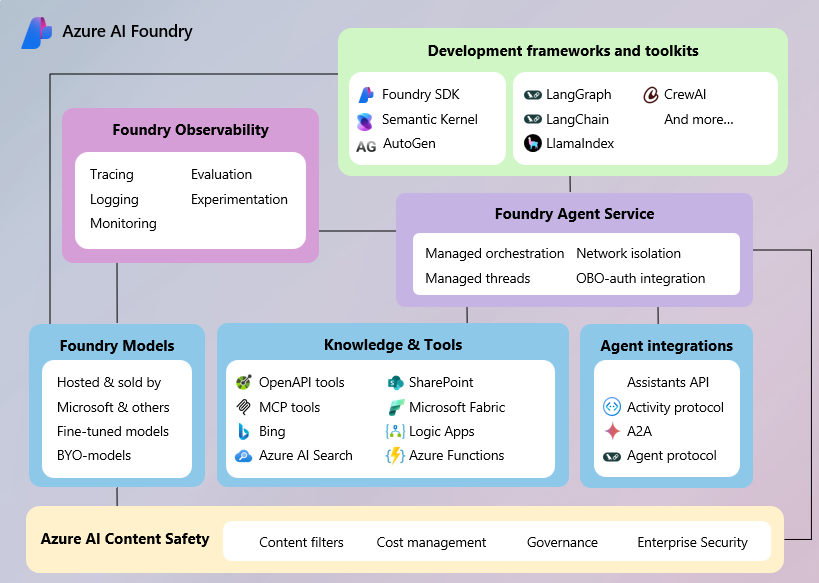
Agent Service jako łącznik między modelem, tools, i infrastrukturą
Korzyści:
- ✅ Managed orchestration - nie musisz pisać tool call handling
- ✅ Integrated security - Content Safety, RBAC, VNet built-in
- ✅ Observability - traces/logs automatycznie w Application Insights
- ✅ Scalability - production-ready z BCDR
Komponenty agenta
Key Points:
- Model = reasoning engine (GPT-5, GPT-4.1)
- Instructions = rolа i behavior agenta
- Tools = dostęp do danych (knowledge) i akcje (actions)
- Start simple: najmniejszy model + jasne instructions + niezbędne tools
3 komponenty agenta: Model (reasoning), Instructions (behavior), Tools (capabilities)
Każdy agent w Azure AI Foundry składa się z trzech kluczowych elementów:
1. Model (LLM)
Model zapewnia reasoning i rozumienie języka naturalnego.
Dostępne modele (Azure OpenAI):
- GPT-5 series: gpt-5, gpt-5-mini, gpt-5-nano, gpt-5-chat
- GPT-4.1 family: gpt-4.1, gpt-4.1-nano, gpt-4.1-mini
- GPT-4o family: gpt-4o, gpt-4o-mini
Wybór modelu:
| Model | Przypadek użycia | Koszt |
|---|---|---|
| GPT-5 | Najbardziej zaawansowane reasoning | Najwyższy |
| GPT-5-mini | Balans między capability a kosztem | Średni |
| GPT-5-nano | Szybkie, proste zadania | Niski |
| GPT-4.1 | Sprawdzone, stabilne rozwiązanie | Średni |
| GPT-4.1-mini | Lżejsza wersja 4.1, szybsza | Niski-średni |
| GPT-4.1-nano | Najszybsza wersja 4.1 | Niski |
| GPT-4o | Zoptymalizowany pod kątem multimodal | Średni |
| GPT-4o-mini | Kompaktowa wersja 4o | Niski |
Tip: Wybieraj najmniejszy model spełniający wymagania. Możesz później upgrade’ować.
2. Instructions
Instructions definiują cel, zachowanie i ograniczenia agenta.
Dobre praktyki:
- Jasno określ rolę agenta (np. “You are a customer support agent”)
- Definiuj oczekiwane zachowania
- Wskaż ograniczenia (np. “Don’t share personal data”)
- Opisz cel każdego tool
Przykład:
instructions = """
You are a helpful customer support agent for an e-commerce platform.

Your responsibilities:
- Answer product questions using Azure AI Search tool
- Check order status using the order_lookup function
- Escalate complex issues to human agents

Guidelines:
- Be concise and friendly
- Always verify user identity before sharing order details
- Use tools to ground responses, don't rely on base knowledge
"""
3. Tools
Tools rozszerzają możliwości agenta o dostęp do danych i akcje.
Kategorie:
| Typ | Narzędzia | Przypadek użycia |
|---|---|---|
| Knowledge | Azure AI Search, File Search, Bing Grounding | Dostęp do danych |
| Action | Azure Functions, OpenAPI, Logic Apps | Wykonywanie akcji |
| Code | Code Interpreter | Analiza danych, obliczenia |
Mogą być dodane na poziomie agenta, threada i runa.
Można dodać wiele narzędzi, ale jedną istancję toola z kategorii Knowledge.
Agent vs Assistant
Key Points:
- Agent = autonomia, wieloetapowe workflow, samodzielne decyzje
- Assistant = reaktywny, wspomaga człowieka, jednorazowe odpowiedzi
- Agents są podstawą automatyzacji biznesowej
Kluczowa różnica: autonomia.
| Aspekt | Assistant | Agent |
|---|---|---|
| Autonomia | Wspiera użytkownika | Samodzielnie realizuje cele |
| Inicjatywa | Reaguje na pytania | Podejmuje decyzje |
| Zakres | Jednorazowe odpowiedzi | Wieloetapowe workflow |
| Tools | Opcjonalne | Kluczowe dla funkcjonalności |
| Przykład | Chatbot FAQ | System przetwarzania faktur |
Przykład różnicy:
User: "Send email to marketing team about Q4 results"

Assistant response:
"I can help you draft that email. What points would you like to include?"

Agent response:
✓ Retrieves Q4 results from database
✓ Generates summary with key metrics
✓ Formats email using company template
✓ Sends email to marketing@company.com
✓ Logs action in CRM
"Email sent successfully to 5 recipients."
Threads, Runs, Messages
Key Points:
- Thread = session konwersacji (do 100,000 messages)
- Message = pojedyncza komunikacja (text, images, files)
- Run = wykonanie agenta na thread (lifecycle: queued → in_progress → completed/failed)
- CMK encryption dla threads i files (Standard Setup)
Kluczowe koncepty zarządzania konwersacjami w Azure AI Foundry Agent Service.

Model konwersacji: Thread (session) → Messages (komunikacja) → Run (wykonanie agenta)
Threads
Thread = session konwersacji między agentem a użytkownikiem.
Cechy:
- Persistent storage conversation history
- Auto-truncation dla fit w context window
- Support do 100,000 messages per thread
- Każdy thread ma unique ID
- CMK encryption (Customer-Managed Keys) w Standard Setup
Kiedy tworzyć nowy thread:
- Nowa konwersacja z użytkownikiem
- Potrzebny jest reset context
- Different user session
Python example:
# Create thread
thread = project_client.agents.threads.create()
print(f"Thread ID: {thread.id}")

# Reuse thread
message = project_client.agents.messages.create(
    thread_id=thread.id,
    role="user",
    content="Follow-up question"
)
Messages
Message = pojedyncza komunikacja w thread.
Typy:
- User messages: Od end-user
- Agent messages: Response od agenta
- System messages: Internal (nie widoczne dla user)
Content types:
- Text
- Images
- File attachments (do 100,000 per thread)
Annotations:
- URL citations (np. z Bing Grounding)
- File references
Runs
Run = wykonanie agenta na thread.
Lifecycle:
queued → in_progress → [requires_action] → completed/failed
Run statuses:
| Status | Opis | Action required |
|---|---|---|
queued |
Czeka na execution | Wait |
in_progress |
Agent wykonuje task | Poll status |
requires_action |
Needs approval (np. MCP tool) | Submit approval/rejection |
completed |
Success ✓ | Retrieve response |
failed |
Error occurred | Check last_error |
cancelled |
User cancelled | - |
expired |
Timeout | Retry |
Polling pattern:
import time

run = project_client.agents.runs.create(
    thread_id=thread.id,
    agent_id=agent.id
)

while run.status in ["queued", "in_progress"]:
    time.sleep(1)
    run = project_client.agents.runs.get(
        thread_id=thread.id,
        run_id=run.id
    )

if run.status == "completed":
    messages = project_client.agents.messages.list(thread_id=thread.id)
    print(messages)
elif run.status == "failed":
    print(f"Error: {run.last_error}")
Wzorce wdrożenia: Główna ścieżka (70-90% przypadków)
Key Points:
- 70-90% przypadków pokrywa Azure AI Foundry Agent Service runtime
- Standard Setup = Twoje zasoby (Cosmos DB, Storage) w Twojej subskrypcji
- CMK encryption dla threads i files
- Connected Agents = multi-agent BEZ custom orchestrator
- API Management = warstwa integracji
Kluczowa zasada:
┌──────────────────────────────────────────────────────────┐
│ WIĘKSZOŚĆ PRZYPADKÓW (70-90%)                           │
│ ↓                                                        │
│ Azure AI Foundry Agent Service Runtime                  │
│ + Standard Setup (Twoje zasoby + CMK)                   │
│ + API Management (warstwa integracji)                   │
│ + Connected Agents (multi-agent built-in)               │
│ = Production-ready, secure, compliant                   │
└──────────────────────────────────────────────────────────┘
Standard Agent Setup (dla tego warsztatu)
Standard Setup to deployment model, gdzie:
✅ Twoje zasoby w Twojej sieci:
- Cosmos DB (threads storage)
- Azure Storage (files storage)
- Azure AI Search (optional, dla knowledge)
- Wszystko w Twojej subskrypcji
✅ CMK Encryption:
- Customer-Managed Keys dla threads i files
- Pełna kontrola nad kluczami szyfrującymi
✅ VNet Support:
- Private endpoints
- Subnet delegation do
Microsoft.App/environments - Network isolation
✅ Compliance:
- Project-level data isolation
- BCDR-ready (backup/restore via Cosmos DB)
- Audit logs
Dla developerów: W tym warsztacie używamy Standard Setup - wszystkie threads i files są w waszych zasobach, zaszyfrowane waszymi kluczami. Terraform automatycznie provisioning Cosmos DB, Storage, i AI Search.
API Management jako warstwa integracji
Azure API Management zapewnia:
- Gateway dla agent APIs
- Rate limiting i throttling
- Authentication/Authorization (OAuth, JWT, API keys)
- Caching dla responses
- Monitoring i analytics
Use case: Expose agent jako REST API dla external consumers.
Connected Agents (Multi-Agent Built-In)
Connected Agents pozwalają na budowę systemów multi-agent BEZ custom orchestratora.
Architektura:
Main Agent (Orchestrator)
    ├─→ Sub-Agent 1: Clause Summarizer
    ├─→ Sub-Agent 2: Compliance Validator
    └─→ Sub-Agent 3: Risk Assessor
Ważne: Connected agents mają maximum depth = 2. Sub-agent nie może mieć własnych sub-agentów.
Kiedy używać:
- ✅ Zadanie wymaga wielu specjalizacji
- ✅ Każdy sub-agent ma wyraźną odpowiedzialność
- ✅ Chcesz reusable components
12-Factor Agents: Zaawansowane przypadki (10-30%)
Key Points:
- 12-Factor Agents = metodologia dla custom builds
- Use case: zaawansowane control flow, specific state management
- 10-30% przypadków wymaga custom orchestration
- Agents are “mostly just software” with strategically placed LLM steps
┌──────────────────────────────────────────────────────────┐
│ ZAAWANSOWANE PRZYPADKI (10-30%)                         │
│ ↓                                                        │
│ 12-Factor Agents Methodology                            │
│ + Custom orchestration                                  │
│ + Pełna kontrola nad execution flow                    │
│ = Maksymalna elastyczność                              │
└──────────────────────────────────────────────────────────┘
Kiedy używać 12-Factor Agents?
❌ NIE używaj gdy:
- Agent Service runtime pokrywa use case
- Connected Agents wystarczają do multi-agent
- Nie potrzebujesz custom control flow
✅ Użyj gdy:
- Specyficzny state management (nie Thread-based)
- Custom retry/error handling logic
- Integration z legacy systems wymaga kontroli
- Compliance wymaga specific audit trail
Core Principles
Metodologia budowy produkcyjnych agentów AI, inspirowana 12-factor apps.
| Factor | Opis | Znaczenie |
|---|---|---|
| 1. Natural Language to Tool Calls | Konwertuj intent użytkownika do structured function calls | Foundation of agentic behavior |
| 2. Own your prompts | Kontroluj prompt engineering bezpośrednio | Nie polegaj tylko na framework defaults |
| 3. Own your context window | Zarządzaj co wchodzi do context | Unikaj information overload |
| 4. Tools are structured outputs | Traktuj tool calls jako JSON responses | Nie jako “magię” frameworku |
| 5. Unify execution & business state | Synchronizuj agent state i application state | Single source of truth |
| 6. Launch/Pause/Resume | Wspieraj interruption i recovery | Długotrwałe procesy |
| 7. Contact humans via tool calls | Human escalation = tool invocation | Consistent pattern |
| 8. Own your control flow | Definiuj decision logic explicite | Kontrola nad autonomią |
| 9. Compact errors into context | Reprezentuj failures zwięźle | Informed retry |
| 10. Small, focused agents | Buduj narrow-purpose agents | Lepsze niż monolith |
| 11. Trigger from anywhere | Multi-channel deployment | Email, Slack, API, UI |
| 12. Stateless reducer pattern | Agent = pure function over state | No hidden side effects |
Dlaczego 12-Factor Agents?
Problem z “pure agentic loops”:
- Nieprzewidywalne zachowanie
- Trudny debugging
- Brak kontroli nad kosztami
- Compliance risks
Rozwiązanie:
Agents are “mostly just software” with strategically placed LLM steps.
Rezultat:
- Przewidywalne execution paths
- Łatwiejsze testowanie
- Kontrolowane koszty
- Production-ready reliability
Wzorce biznesowe
Key Points:
- Customer Support Agent = Azure AI Search + Function calling + escalation
- Document Processing Agent = File Search + Code Interpreter + Functions
- Research Agent = Bing Grounding + Deep Research tool
- Connected Agents = orchestrator + specialized sub-agents
Pattern 1: Customer Support Agent
Use case: Automatyzacja pierwszej linii wsparcia.
Komponenty:
- Model: GPT-4.1 (rozumienie kontekstu, empathy)
- Instructions: Customer service best practices, escalation rules
- Tools:
- Azure AI Search → Knowledge base
- Function calling → Ticket creation
- Connected Agent → Human escalation
Przykład kodu:
from azure.ai.projects import AIProjectClient
from azure.identity import DefaultAzureCredential

project_client = AIProjectClient(
    endpoint=os.environ["PROJECT_ENDPOINT"],
    credential=DefaultAzureCredential()
)

# Create customer support agent
agent = project_client.agents.create_agent(
    model="gpt-4.1",
    name="customer-support-bot",
    instructions="""
    You are a customer support agent for TechCorp.

    Your goals:
    1. Understand customer issues clearly
    2. Search knowledge base for solutions
    3. Create support tickets for unresolved issues
    4. Escalate to human agent if customer is frustrated

    Tone: Friendly, professional, empathetic
    """,
    tools=[
        {"type": "azure_ai_search"},  # Knowledge base
        {"type": "function", "function": {
            "name": "create_ticket",
            "description": "Create support ticket",
            "parameters": {...}
        }}
    ]
)
Pattern 2: Document Processing Agent
Use case: Automatyczna analiza i ekstrakcja danych z dokumentów.
Komponenty:
- Model: GPT-4 (złożona ekstrakcja)
- Instructions: Extraction rules, validation criteria
- Tools:
- File Search → Document access
- Code Interpreter → Data processing
- Azure Functions → Database integration
Flow:
- Upload document → File Search
- Extract data → Code Interpreter
- Validate & transform → Business logic
- Store → Azure Functions → Database
Pattern 3: Research Agent
Use case: Głęboka analiza tematyczna z wielu źródeł.
Komponenty:
- Model: o3-deep-research
- Tools:
- Bing Grounding → Web research
- Azure AI Search → Internal docs
- Deep Research tool → Multi-step analysis
Przykład:
agent = project_client.agents.create_agent(
    model="o3-deep-research",
    name="market-research-agent",
    instructions="""
    Conduct comprehensive market research.

    Process:
    1. Identify key topics and competitors
    2. Gather data from web and internal sources
    3. Analyze trends and patterns
    4. Synthesize findings into executive summary
    """,
    tools=[
        {"type": "bing_grounding"},
        {"type": "deep_research"}
    ]
)
Pattern 4: Connected Agents - Contract Review System
Przykład:
# Sub-agent 1: Clause extraction
clause_agent = project_client.agents.create_agent(
    model="gpt-4",
    name="clause_extractor",
    instructions="Extract and summarize contract clauses",
    tools=[{"type": "file_search"}]
)

# Sub-agent 2: Compliance check
compliance_agent = project_client.agents.create_agent(
    model="gpt-4",
    name="compliance_checker",
    instructions="Check contract against company policies",
    tools=[
        {"type": "azure_ai_search"},  # Policy database
        {"type": "function", "function": {
            "name": "check_compliance_rules",
            "description": "Validate against compliance API"
        }}
    ]
)

# Main orchestrator agent
main_agent = project_client.agents.create_agent(
    model="gpt-4.1",
    name="contract_orchestrator",
    instructions="""
    You coordinate contract review process.

    Workflow:
    1. Use clause_extractor to identify key sections
    2. Use compliance_checker to validate against policies
    3. Synthesize findings into review summary
    """,
    tools=[
        ConnectedAgentTool(
            id=clause_agent.id,
            name="clause_extractor",
            description="Extracts contract clauses"
        ),
        ConnectedAgentTool(
            id=compliance_agent.id,
            name="compliance_checker",
            description="Validates compliance"
        )
    ]
)
FAQ: Kluczowe punkty
Key Points:
- Dane w Microsoft-managed (Basic) lub customer-owned (Standard) resources
- CMK support dla threads i files
- Dane NIE są używane do treningu modeli
- VNet wymaga subnet delegation + minimum /27 (recommended /24)
Gdzie są przechowywane dane?
Basic Setup:
- Microsoft-managed Cosmos DB
- Microsoft-managed Storage
- Region: ten sam co AI Foundry Hub
Standard Setup (warsztat):
- Twoje Cosmos DB (threads)
- Twoje Azure Storage (files)
- Twoje Azure AI Search (optional)
- CMK encryption (Customer-Managed Keys)
Czy dane są używane do treningu modeli?
NIE. Dane z threads, messages, i files NIE są używane do treningu Azure OpenAI models.
VNet Requirements
Subnet delegation:
- Wymagane: subnet delegowany do
Microsoft.App/environments - Minimum size:
/27(32 adresy) - Recommended size:
/24(256 adresów)
Service tags (firewall):
AzureActiveDirectory- wymagane dla authenticationAzureFrontDoor.Backend- opcjonalne dla CDN
Checklist budowy agenta
Przed deploymentem agenta sprawdź:
Fundamentals:
- Model wybrany zgodnie z wymaganiami (capability vs cost)
- Instructions jasno definiują rolę i zachowanie
- Tools są niezbędne i dobrze skonfigurowane
Testing:
- Testowane edge cases (errors, unexpected inputs)
- Load testing dla expected volume
Security & Compliance:
- Content filters włączone (prompt injection, harmful content)
- RBAC skonfigurowane (principle of least privilege)
- CMK encryption (jeśli required)
- VNet isolation (jeśli required)
- Audit logs enabled
Observability:
- Monitoring i logging włączone (Application Insights)
- Alerts skonfigurowane (failed runs, high latency)
- Dashboards dla key metrics
Cost & Limits:
- Cost limits i rate limiting skonfigurowane
- Token usage monitored
- Quota limits understood
Operations:
- Human escalation path zdefiniowany
- Runbook dla troubleshooting
- Backup/restore tested (Standard Setup)
Best Practices
Do’s ✓
- Start simple: Zacznij od prostego agenta, iteruj
- Own your prompts: Nie polegaj tylko na defaults
- Monitor everything: Traces, logs, costs
- Test edge cases: Failures, timeouts, bad inputs
- Document behavior: Co agent robi i dlaczego
- Use Standard Setup: Dla production (CMK, VNet, BCDR)
Don’ts ✗
- Nie przeciążaj: Jeden agent = jedna odpowiedzialność
- Nie ignoruj errors: Compact errors into context, retry smart
- Nie guessuj intencji: Ask clarifying questions
- Nie pomijaj security: Content filters, RBAC, audit logs
- Nie zapomnij kosztów: Monitor token usage, set limits
Źródła i dalsze czytanie
Microsoft Learn:
- Azure AI Foundry Agent Service Overview
- Threads, Runs, Messages
- Standard Agent Setup
- Connected Agents
- Tools Overview
- FAQ
GitHub:
Podsumowanie
W tym labie poznaliśmy:
- Co to jest agent: Model + Instructions + Tools z autonomią
- Agent Service: “The glue” łączący wszystkie komponenty
- Threads/Runs/Messages: Model konwersacji z CMK encryption
- 70-90% przypadków: Azure AI Foundry Agent Service runtime (Standard Setup + API Management + Connected Agents)
- 10-30% przypadków: 12-Factor Agents dla custom builds
- Wzorce biznesowe: Customer support, document processing, research, multi-agent